Yesterday I spent 5 hours finishing up my work on our school-wide grading system Engrade. I deleted the final group of seniors, made sure all names were typed the same, and added the new group of sixth graders. It was tedious work, but I'm glad it is done.
Today, I spent two hours finishing up the Internet Safety lesson for the beginning of the year. This will be presented to all students during the first week of school. These 2 hours finished up my required 30 hours.
However, in the next few weeks, I know I will be setting up the computer lab, helping other staff with their setup, and other various work.
Friday, July 20, 2012

Wednesday, July 18, 2012
QR Codes
I spent an hour figuring out how to make QR codes for all of our staff this year. For those of you who do not know, QR codes are the bar codes that can be scanned with a smart phone. This year for open house, all of our staff will have a sign outside their door with their own individual QR code. Parents will be able to scan it and get their teacher's information stored instantly. I did some research and decided to use this site to create the QR codes. I plan on finishing these tomorrow.
Tuesday, July 17, 2012
Data, Data, Data
I spent 5 hours updating our Grade Portal Engrade today. It can be very finicky, so what seemed simple at first turned out to be a very long enduring task. I went through and made sure all names were typed the same and that all student ID's were correct. I also finished deleting the seniors who graduated this past spring.
Sunday, July 15, 2012
Digital Citizenship
Thursday I met for half hour with my principal and discussed some technology needs for the fall. The one she asked me to tackle while we are waiting for the school to finish being cleaned (fingers crossed that we reopen tomorrow) is a lesson on digital citizenship/Internet safety. So I discussed some ideas with our tech coach. He said it should be a lesson that we can use this year for all grades and then next year with the 6th grade and new students. We decided that we would create another lesson that could be added on to the curriculum next year. He also said he wanted it to be something that the 2 of us could present to all grades to make sure that a uniform front is presented. Money is limited so he told me to utilize free resources or make resources as much as possible.
So, this weekend I have been researching and working on this task. I have spent 2 hours working and have found a TON of great resources. I will share two of them with you here.
The second lesson I am looking at is along similar lines, With Power Comes Responsibility (Click here to go to that lesson). Both lessons look like great tools that I can adapt to our needs.
So my goal tomorrow is to decide between the two lessons, adapt any parts that need to change and/or create anything that needs to be made, and email it to my administrator and tech coach for approval.
So, this weekend I have been researching and working on this task. I have spent 2 hours working and have found a TON of great resources. I will share two of them with you here.
- Digital Passport
- If I taught elementary or even just middle school, I would totally be using this resource. It is in Beta stage, but is really neat. You create accounts for students who then can log in and go through learning modules based on different lessons (online chatting, privacy, searching, creating work, etc.). The lessons include videos and games that help the students learn. The students earn badges toward their passport.
- Common Sense Media
- Since our school is 6-12, however, I think this option will be much more suitable. The lessons are all available online for free or you can purchase them on a jumpdrive. Each lesson comes with a printable lesson plan, activity sheets, videos, assessments, and more. The lessons estimate in time from 45 minutes to 1 hour so they are perfect for an assembly with our students.
The second lesson I am looking at is along similar lines, With Power Comes Responsibility (Click here to go to that lesson). Both lessons look like great tools that I can adapt to our needs.
So my goal tomorrow is to decide between the two lessons, adapt any parts that need to change and/or create anything that needs to be made, and email it to my administrator and tech coach for approval.
Monday, July 9, 2012
Meeting
This morning I got to sit in on a planning meeting with administrators and the leadership team. I spent 2 hours discussing the mission and vision statement and how technology integrated into both of these guiding documents. We talked about our limitations in the technology department and how regardless of this, we could implement the importance of technological skills in an ever-changing, global world. I felt really good about how we put technology as an important part of our belief statements.
Tuesday, July 3, 2012
Surveys
Today I spent 2 1/2 hours working on a survey for our administrator. I met her at school this morning to receive all of the documents and get her specific directions. Then, later today I created the actual survey and tested it. I was going to use Google Docs to create a form, but our school districts filter always is really iffy with Google Docs. My administrator suggested SurveyMonkey which I have used in some of my other classes. I started out using SurveyMonkey, only to learn that it only allows you to create up to ten questions for free. So I did some more research and decided to go with Kwik survey because its format was similar to SurveyMonkey. I cannot share the survey with you because it is for our school improvement plan and locked with each staff members email. My principal had mentioned limiting the number of responses, but I told her that I could set it up to only allow those with the email address I provided to take the survey. So as soon as she sends me the list, I will be adding the staff. It was tedious, but I learned the pros and cons of "free" and creating online surveys.
Wednesday, June 27, 2012
Engrade
This week I have spent 5 hours upgrading our school-wide grading system called Engrade. I have been given the task to go through and make sure that new students were added and that seniors were deleted. That is what I have been doing. I have a student roster with student name and ID number. I went through and deleted seniors. And began to add the 6th graders. My goal for the rest of the week is to finish the 6th graders and then delete duplicate accounts. We are hoping that this will make Engrade better for everyone by having a universal system for each name and ID. This should make printing progress reports easier and remedy the duplicates that existed in the past.
Sunday, June 17, 2012
Inventory
On Thursday, I spent 3 hours working at the school. I spent an hour on inventory at school. I had to go to each room to check to see if all classroom technology had been secured for the summer. I also spent an hour updating my principal on Star Portal. We are rolling over to a new system in a few weeks. The new system is much easier to use than Star Portal. However, we need to save copies of all of the scheduling we have done the last few weeks in case there is an issue when the new system starts in July. I ran the system and gathered all of the documents she needed. I saved them all as PDF's on her computer. I also showed her how to compress the files for sending. All of this was simple, but she was very appreciative. It was one of the first times I saw the real value of being able to show other people how to do things on the computer.
Tuesday, June 12, 2012
Getting Oriented
Last week was not quite as successful as I would have liked. Our principal was away at administrator retreat with others from the district. I did, however, get in a few hours with our building tech coach. Before school got out we spent an hour working on technology inventory for the school. Every year we are told to turn in a list of technology into the tech coach. There is very little order to this request. Each teacher types (some even hand write--the horror) a list of the technology in their room. This typically includes any computers, laptops, projectors, etc. Most teachers don't know the names of their technology and hardly any know to put the county ID number down. After helping our tech coach with this situation this year, one of the jobs I have been assigned is to create a universal form. I am going to do this on Google docs so that all staff can fill it out online and turn it in there as well. To go along with this form I am going to create a step-by-step tutorial for our staff members who are still very low in basic skills. I am going to check to make sure that all staff secured their classroom technology this week. This will be difficult with the inventory forms that were turned in this year, but hope my work this summer will help alleviate this problem next year.
Before our tech coach leaves for vacation for the next 3 weeks, we decided on the following tasks:
I am excited for the work that I will be doing over the next few weeks!
Before our tech coach leaves for vacation for the next 3 weeks, we decided on the following tasks:
- Create classroom technology inventory Google docs form.
- Create lesson on Internet safety to present to teachers and students this year based on new regulations by the State.
- Update Engrade (school-wide grade portal).
- Check for security of classroom technology.
- Create Engrade tutorial for new teachers.
I am excited for the work that I will be doing over the next few weeks!
Sunday, April 29, 2012
Why should my students blog?
Two years ago, I made the decision that my students were going to become bloggers. I blogged in high school through LiveJournal and Xanga and loved it. I had no doubt that my students would think this was "cool" and would enjoy it more than a 5 paragraph essay on wide-rule notebook paper.
Now, I teach 9-12 high school students. Most are either in World Geography or World History class. I decided that blogging would be the perfect way to get them writing. I was super excited and dove right in only to have it all come crashing down around me. See, I only have one student computer in my class and the computer lab is usually reserved for math or language classes. I had hoped students would be able to blog at home only to discover that most had Internet on their phone, but not unlimited plans or access at their homes. I was pretty upset. I did at least attempt blogging a few times, but it was very tedious with only one computer.
I pretty much gave up on student blogging after that experience. Recently, however, so many of the bloggers that I follow have been mentioning student blogging again. It's almost been like a sign that maybe it is time to try again. So hopefully next school year, I will figure out a way to make blogging, or at least micro-blogging work for me!
One of my favorite articles on student blogging can be accessed at this site. Mrs. Ripp lists her top ten reasons why students should blog. Here is a paraphrased list of her reasons.
First, we are quickly becoming a paperless society. Blogging eliminates nuisance such as storage of Composition books, messy handwriting, smudgy ink, etc. It is easier for both teacher and student. I can access their writing from my classroom, home, and even on the go on my Kindle Fire. Students can also access their work from many platforms which means forgetting your supplies becomes a bad excuse.
Next, blogging opens communication up between student and teacher and peer to peer in a completely new way. Both teacher and student can bring up questions and opinions in an open forum. Commenting on strong work, good ideas, etc. can open up even more ideas which can really help students as they delve into deeper depths of knowledge.
Also, our students use technology CONSTANTLY! Those against technology in the classroom for safety reasons really annoy me because usually they are ignoring the fact that it is a part of our lives that is not going away. My 6 month old niece already knows how to tap color specific buttons on her Dad's Ipad. Rather than ignoring these new technologies, I believe that we should embrace them and teach our students appropriate use. Blogging is just one way that we can do that. Students learn about Internet safety in regard's to personal information, but also learn Netiquette and global citizenship. These are skills that will help them greatly in their adult lives.
Finally, blogging gives the teacher an easy way to check for understanding. It is typically easy for students to avoid a teacher when they are less than confident in the classroom. However, if every student is maintaining a blog, it is easy for even the quietest student's voice to be heard. Misconceptions or weak knowledge can be identified in a low pressure situation and alleviated either through comments on the blog or reteaching in the classroom.
I think that this article really brought to life the reasons why blogging is important in the classroom. It definitely has made me want to explore opportunities for blogging with my students next year.
If you think blogging is something you would like to try in your classroom, here are a few resources that I found useful:
Now, I teach 9-12 high school students. Most are either in World Geography or World History class. I decided that blogging would be the perfect way to get them writing. I was super excited and dove right in only to have it all come crashing down around me. See, I only have one student computer in my class and the computer lab is usually reserved for math or language classes. I had hoped students would be able to blog at home only to discover that most had Internet on their phone, but not unlimited plans or access at their homes. I was pretty upset. I did at least attempt blogging a few times, but it was very tedious with only one computer.
I pretty much gave up on student blogging after that experience. Recently, however, so many of the bloggers that I follow have been mentioning student blogging again. It's almost been like a sign that maybe it is time to try again. So hopefully next school year, I will figure out a way to make blogging, or at least micro-blogging work for me!
One of my favorite articles on student blogging can be accessed at this site. Mrs. Ripp lists her top ten reasons why students should blog. Here is a paraphrased list of her reasons.
- Audience
- Easy to store/track
- Open communication
- Teaches safe Internet use
- Peer teaching
- Teaches global citizenship
- Transparency of learning
- Become aware of writing style
- Quick check of understanding
- Students have a voice
First, we are quickly becoming a paperless society. Blogging eliminates nuisance such as storage of Composition books, messy handwriting, smudgy ink, etc. It is easier for both teacher and student. I can access their writing from my classroom, home, and even on the go on my Kindle Fire. Students can also access their work from many platforms which means forgetting your supplies becomes a bad excuse.
Next, blogging opens communication up between student and teacher and peer to peer in a completely new way. Both teacher and student can bring up questions and opinions in an open forum. Commenting on strong work, good ideas, etc. can open up even more ideas which can really help students as they delve into deeper depths of knowledge.
Also, our students use technology CONSTANTLY! Those against technology in the classroom for safety reasons really annoy me because usually they are ignoring the fact that it is a part of our lives that is not going away. My 6 month old niece already knows how to tap color specific buttons on her Dad's Ipad. Rather than ignoring these new technologies, I believe that we should embrace them and teach our students appropriate use. Blogging is just one way that we can do that. Students learn about Internet safety in regard's to personal information, but also learn Netiquette and global citizenship. These are skills that will help them greatly in their adult lives.
Finally, blogging gives the teacher an easy way to check for understanding. It is typically easy for students to avoid a teacher when they are less than confident in the classroom. However, if every student is maintaining a blog, it is easy for even the quietest student's voice to be heard. Misconceptions or weak knowledge can be identified in a low pressure situation and alleviated either through comments on the blog or reteaching in the classroom.
I think that this article really brought to life the reasons why blogging is important in the classroom. It definitely has made me want to explore opportunities for blogging with my students next year.
If you think blogging is something you would like to try in your classroom, here are a few resources that I found useful:
- Article on how to make blogging meaningful for students.
- Youtube video on blogging in the classroom.
Sunday, April 22, 2012
Ipads in the Classroom: Do they really make a difference?
Article: Less than a Class Set (December 2011/January 2012). http://iwelearning.edublogs.org/files/2011/12/dec2011-iste-article-about-using-iPads-in-small-numbers-qxrko7.pdf
Summary: This article discusses one of the hottest growing trends in instructional technology, the Ipad. The article discusses how some teachers/classrooms are hesitant to use Ipads because they are costly and a classroom set is impossible to purchase. The teacher goes on to discuss a case study where classrooms only had a few Ipads and were very successful. The author notes one way to use the Ipads is to set up learning centers using other technologies or lessons. Also, grouping students into pairs or trios promotes critical thinking while using apps. The article also points out some rules for things you should do if you are only going to have access to a few Ipads versus a classroom set.
Review: This article is a really good one. I know that I would not be able to purchase a classroom set of Ipads, but might be able to get access to 1-2. I think that I could use the Ipad for things such as Google Earth and History Channel. My students tend to work well in groups so I would be curious to see how it worked with the Ipad. The only thing I worry about is how jealous they would get over time spent with the Ipad.
Summary: This article discusses one of the hottest growing trends in instructional technology, the Ipad. The article discusses how some teachers/classrooms are hesitant to use Ipads because they are costly and a classroom set is impossible to purchase. The teacher goes on to discuss a case study where classrooms only had a few Ipads and were very successful. The author notes one way to use the Ipads is to set up learning centers using other technologies or lessons. Also, grouping students into pairs or trios promotes critical thinking while using apps. The article also points out some rules for things you should do if you are only going to have access to a few Ipads versus a classroom set.
Review: This article is a really good one. I know that I would not be able to purchase a classroom set of Ipads, but might be able to get access to 1-2. I think that I could use the Ipad for things such as Google Earth and History Channel. My students tend to work well in groups so I would be curious to see how it worked with the Ipad. The only thing I worry about is how jealous they would get over time spent with the Ipad.
Saturday, April 14, 2012
My Fake Wall
While reading and researching for another class, I came across a site that I just had to share! See for a long time I have had my history students create Fake Facebook accounts on a paper template I found. They had to do paper ones because it is wrong to do on the real Facebook site and Facebook is blocked at school. I thought this was an original idea, but then one of my catalogs had a digital CD or poster version you could order called Farcebook. Still, both of these cost money and the poster one would require printing, gluing, etc. The site that I found today lets you create a fake "wall" on any character you want. You have to sign up to join, but it is totally free.
Baltimore County Public Schools' Resource Wiki for Software, Assistive Technologies, Web 2.0 Tools, Digital Content, and Resources has written a great post on using My Fake Wall. The author posts a description, directions, ideas for classroom use, and ideas for differentiating. Also, I found a great PDF step-by-step tutorial you can use that starts with creating an account and goes through the entire process.
Want to see 2 of the My Fake Wall profiles I found that were really neat? Click below!
Martin Luther My Fake Wall
FDR My Fake Wall
to share! See for a long time I have had my history students create Fake Facebook accounts on a paper template I found. They had to do paper ones because it is wrong to do on the real Facebook site and Facebook is blocked at school. I thought this was an original idea, but then one of my catalogs had a digital CD or poster version you could order called Farcebook. Still, both of these cost money and the poster one would require printing, gluing, etc. The site that I found today lets you create a fake "wall" on any character you want. You have to sign up to join, but it is totally free.Baltimore County Public Schools' Resource Wiki for Software, Assistive Technologies, Web 2.0 Tools, Digital Content, and Resources has written a great post on using My Fake Wall. The author posts a description, directions, ideas for classroom use, and ideas for differentiating. Also, I found a great PDF step-by-step tutorial you can use that starts with creating an account and goes through the entire process.
Here are some ways you can use My Fake Wall:
Profile on any historical character, biography on important person from math, science, etc., profile on a book character. You can share the link to your profile with others which makes collaborating and learning really easy.
This teacher shared a project for the book The Outsiders. One of the documents in their downloadable pack is a rubric for the project. Definitely a great tool for assessment!
This is such a great tool that reaches all levels of Bloom's. You have to recall basic information, but by adding relationships, friends, networks, etc. you are reaching higher levels of thinking.
Want to see 2 of the My Fake Wall profiles I found that were really neat? Click below!
Martin Luther My Fake Wall
FDR My Fake Wall

Sunday, April 1, 2012
Something to Flip About!
I've been hearing about flipped classrooms for the past few months in my graduate classes. I glanced over this idea the first few times, but recently have grown more interested in the topic. This article got me really thinking about a flipped classroom and how it would work for me in my position. The article is an interview with a teacher who has flipped their classroom. The teacher goes through the reasons for flipping and tips for other teachers. It's a great read, so check it out!
First, a flipped classroom is a classroom where students watch/listen to presentations, lectures, videos, etc. at home. Classroom time is then used for hands-on activities, questioning, explaining, modeling, etc. Check out this infographic from Knewton:

First, a flipped classroom is a classroom where students watch/listen to presentations, lectures, videos, etc. at home. Classroom time is then used for hands-on activities, questioning, explaining, modeling, etc. Check out this infographic from Knewton:
Created by Knewton and Column Five Media
I love the idea of a flipped classroom for Social Studies because so much of my classroom time could be devoted to discussion and actual real thinking. I found this list of resources that can help in the flip classroom. Ironically, I use many of them even though my classroom is currently still traditional.
So, that brings us back to my original question. Would a flipped classroom work for me? Currently, I do not think I could have a flipped classroom even though I badly wish to have one. I live in a rural community where many students do not have Internet connections and even those who do, many times do not have DSL or a fast enough provider for streaming. So for now, I'll keep dreaming!
To find out even more about this growing trend, watch the video below from Khan Academy developer Salman Khan. It is quite long, but very good.
What do you think? Can you flip?
Sunday, March 25, 2012
Review: Poll Everywhere
I always get really excited about new technology. One of the technologies I have always wanted was clickers (student response systems). Unfortunately, only our math and special education departments have these tools to use. One way I have recently found to alleviate this problem is Poll Everywhere.
Watch this video on Poll Everywhere for an introduction.
Poll Everywhere lets you set up "polls". These can be open-ended or multiple choice. Your audience can respond through SMS text messaging or through the computer. One of the best things about Poll Everywhere is that it is FREE! In fact, you do not even have to sign up for an account. Any polls made without an account can only stay viewable for 14 days. However, creating an account is easy. With a free account, you can have 40 responses per poll. There are payment options as well, but I don't see a use for them.
Being able to have students respond would be a great way for me to check student understanding. Because students can use free response, I can even assess higher levels of learning. The only problem is that currently my school does not allow cell phone use in the classroom. I hope that by providing examples such as this tool that this rule can be reassessed before next school year.
Want to see Poll Everywhere for yourself, respond to my poll by clicking below.
Watch this video on Poll Everywhere for an introduction.
Poll Everywhere lets you set up "polls". These can be open-ended or multiple choice. Your audience can respond through SMS text messaging or through the computer. One of the best things about Poll Everywhere is that it is FREE! In fact, you do not even have to sign up for an account. Any polls made without an account can only stay viewable for 14 days. However, creating an account is easy. With a free account, you can have 40 responses per poll. There are payment options as well, but I don't see a use for them.
Being able to have students respond would be a great way for me to check student understanding. Because students can use free response, I can even assess higher levels of learning. The only problem is that currently my school does not allow cell phone use in the classroom. I hope that by providing examples such as this tool that this rule can be reassessed before next school year.
Want to see Poll Everywhere for yourself, respond to my poll by clicking below.
Thursday, March 1, 2012
Ford Motor Module
Not necessarily a review, but I thought this might be useful to some tech savy teachers. It is the Ford Motor Driving Module. It is a set of online lessons, videos, and games.

Monday, February 20, 2012
Social Media in Education
The following video is one that I discovered while researching technologies this weekend on YouTube.
This video really stood out at me for 2 reasons. 1) The facts and statistics presented in the video are shocking, and support using social media in schools. 2) So many people fight using social media.
Last school year, I wanted to create a Ning site for my history students. I thought that it would be a great place for them to "be" another person. Rather than have to write about George Washington, they could become George Washington. Rather than memorize random facts (that do play some importance), students would truly THINK (yes, that dreaded word) about how Washington would have felt, what relationships he would have formed, and what he would have said. So what if Washington and Hitler didn't live at the same time period? Don't you think that Washington would have had thoughts about Hitler and his beliefs. This project would truly meet higher levels of Bloom's because students would have to create these profiles , discussions, and relationships based on their knowledge. Also, I'm only 26, I know that students live in a digital world. It would be much easier to get students to comment on a reading homework assignment through a social media site.
By now, I'm sure you are wondering what my point is. Well, here it is. I had what I thought was a great idea. And how did others' respond to my idea? They shot it down immediately. I was told my our technology department that social media was not allowed under the user agreement even if I created our own site and maintained the site. What a disappointment!
This video just backed up what I felt all along and what I hoped when I wrote my vision for the future. So many are afraid of technology that they won't even take a chance on it. According to the video, last years high school students scored the lowest EVER on the SAT. Rather than blame it on media like many have done, I think that the reasoning behind this is that students are not being tested in what they know. They live in a technological world where information is at their fingertips, yet we expect them to have everything memorized and written (or rather bubbled-in) on a piece of paper.
I wrote my Research class paper on the effects of social media in education. While the purpose of the paper was to prove a null effect, I found time and time again that research supported social media in education. This video brought up a great point....research and hands-on questioning are available now more than ever. The video suggested using Twitter to ask Maya Angelo "why the caged bird sings?" I bet every student in that room would remember that assignment more than a 5 page critique. Yes, writing and critiquing have their place in education, but when are we going to stop trying to stifle and forbid technology and start embracing its use.
This article discusses the pros and cons of using Twitter in the classroom. I definitely think the pros outweigh the cons.
In conclusion, social media is everywhere! The stats about its use by both adults and teenagers is astounding. I think we need to quit fearing the worst and start meeting kids where they are living. Watch the video, read the article, and tell me what you think.
Do you think social media has a role in education?
This video really stood out at me for 2 reasons. 1) The facts and statistics presented in the video are shocking, and support using social media in schools. 2) So many people fight using social media.
Last school year, I wanted to create a Ning site for my history students. I thought that it would be a great place for them to "be" another person. Rather than have to write about George Washington, they could become George Washington. Rather than memorize random facts (that do play some importance), students would truly THINK (yes, that dreaded word) about how Washington would have felt, what relationships he would have formed, and what he would have said. So what if Washington and Hitler didn't live at the same time period? Don't you think that Washington would have had thoughts about Hitler and his beliefs. This project would truly meet higher levels of Bloom's because students would have to create these profiles , discussions, and relationships based on their knowledge. Also, I'm only 26, I know that students live in a digital world. It would be much easier to get students to comment on a reading homework assignment through a social media site.
By now, I'm sure you are wondering what my point is. Well, here it is. I had what I thought was a great idea. And how did others' respond to my idea? They shot it down immediately. I was told my our technology department that social media was not allowed under the user agreement even if I created our own site and maintained the site. What a disappointment!
This video just backed up what I felt all along and what I hoped when I wrote my vision for the future. So many are afraid of technology that they won't even take a chance on it. According to the video, last years high school students scored the lowest EVER on the SAT. Rather than blame it on media like many have done, I think that the reasoning behind this is that students are not being tested in what they know. They live in a technological world where information is at their fingertips, yet we expect them to have everything memorized and written (or rather bubbled-in) on a piece of paper.
I wrote my Research class paper on the effects of social media in education. While the purpose of the paper was to prove a null effect, I found time and time again that research supported social media in education. This video brought up a great point....research and hands-on questioning are available now more than ever. The video suggested using Twitter to ask Maya Angelo "why the caged bird sings?" I bet every student in that room would remember that assignment more than a 5 page critique. Yes, writing and critiquing have their place in education, but when are we going to stop trying to stifle and forbid technology and start embracing its use.
This article discusses the pros and cons of using Twitter in the classroom. I definitely think the pros outweigh the cons.
In conclusion, social media is everywhere! The stats about its use by both adults and teenagers is astounding. I think we need to quit fearing the worst and start meeting kids where they are living. Watch the video, read the article, and tell me what you think.
Do you think social media has a role in education?
Monday, February 6, 2012
Review: Teaching the IGeneration
 Image via Wikipedia
The article that I read was called Teaching the IGeneration.
- The article appeared in Educational Leadership; February 2011, Vol. 68 Issue 5, p10-15, 6p.
- You can obtain the article by following this link:
- http://web.ebscohost.com.ezproxy.lib.apsu.edu/ehost/pdfviewer/pdfviewer?sid=b41fff14-a207-4299-869d-031c74b1abc8%40sessionmgr12&vid=3&hid=9
This article discusses how students in this current age (post 2000) are so comfortable using technology. The author opens the article by discussing a 3 year old who can work a smartphone, a 7 year old who knows how to connect the printer to an Ipad, and a group of pre-teens who use their phones to search information. The author discusses how as educators, we need to start focusing on ways to add technology into our curriculum. The article makes sure to point out that this process should not require more work for the teacher, but rather should be taught to the educators. When used correctly, technology can be such a positive force for this generation of life-long learners.
I chose this article because of our discussion this week on the current state of technology in schools. My rural high school is very behind based on the STAR Assessment. I feel like my distinct needs to see this article. We are doing a disservice to our students by ignoring the fact that this is the world they live in. We are not meeting our students where they are at digitally.
This article poses a few questions:
- What role does technology play in our high schools?
- What problems could arise from using technology in schools?
- How strong is technological education in your district?
- Would this article help convince your district to improve technology in its schools?
What do you think? I'm in the IGeneration and I think we need to amp up our technology soon!

Monday, January 30, 2012
Effectiveness of Educational Technology--A Review
The article I read and reviewed is titled Does This Really Work? The Keys to Implementing New Technology While Providing Evidence That Technology is Successful by Sara Sawtelle. This article appeared in the June/July 2008 edition of Learning and Leading with Technology. You can obtain the article by clicking on this link: http://www.eric.ed.gov/PDFS/EJ824514.pdf.
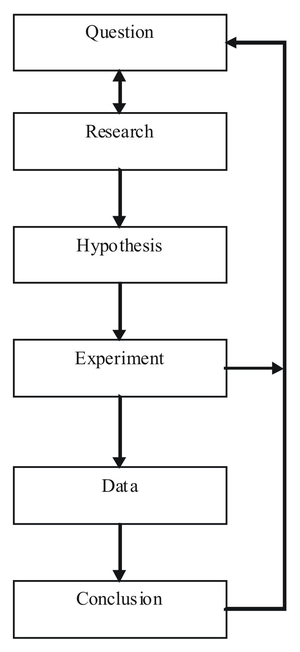 Image via Wikipedia
This article approaches the idea of how to make technology use more effective in the classroom by using the Scientific Method as a planning approach. The author notes that proving that technology use is effective is a very detailed and difficult process. The author suggests using the scientific method because it includes gathering observable , measurable data to determine conclusions. The article follows a fictitious account of a school trying to implement a new technology plan. The principal in the story is supportive of his teacher's plan, but requires that there be statistical supportive data to continue the project.
The planning committee follows the steps of the Scientific Method when implementing technology. They form a hypothesis (the plan) to make sure that the team is working toward the same goal. Under step 2 (planning the experiment) the team chooses which classrooms to implement the technology in and who should be on the team (IT from the district, curriculum and instruction leaders, etc.). Step 3 of the process is preparation. Preparation includes training all staff, students, and stakeholders on the tools. This will ensure that all members are adequately prepared for the experiment and have the most chances for success. Step 4 is testing the predictions. This step involves that dreaded word, documentation. Documentation is the key step to proving that technology use has been effective in the classroom or school. Step 5 is adjustment. At the end of the year, the school gathers all data that they have from Step 4 and from testing data to make changes to the technology plan. The technology in the case proved to be successful and so therefore the teachers suggested that the entire district move forward using the same technology.
I think that this article was very informative and a great suggestion. Every article I read for class this week was either pro technology use in the classroom or against technology use in the classroom. There seemed to be no middle ground when it came to this topic. At the same time, there seemed to be no definite data that supported either side. One reason I chose this article is because I think it suggests a great way to decide the effectiveness of educational technology. Let each school or district decide for itself. Who knows our students, teachers, community, or classrooms the best? We do! This article suggests that by implementing a definite plan and tracking data all year you can make the best decision on whether or technology is being effective in your school. It focuses on school-specific data such as the digital divide and the training that was mentioned in step 3. I think that the suggestions in this article were very accurate and that by implementing such a plan in my school, we would see technology use become much more effective than it is currently. I believe that the ideas and suggestions of this article might be the most applicable suggestions I have read when it comes to educational technology because it follows the Scientific Method, a simple approach that everyone has studied! So what are you waiting for, form a committee, make a hypothesis, collect data, and see how technology begins to affect your classroom or school!

 Image via Wikipedia
This article approaches the idea of how to make technology use more effective in the classroom by using the Scientific Method as a planning approach. The author notes that proving that technology use is effective is a very detailed and difficult process. The author suggests using the scientific method because it includes gathering observable , measurable data to determine conclusions. The article follows a fictitious account of a school trying to implement a new technology plan. The principal in the story is supportive of his teacher's plan, but requires that there be statistical supportive data to continue the project.
The planning committee follows the steps of the Scientific Method when implementing technology. They form a hypothesis (the plan) to make sure that the team is working toward the same goal. Under step 2 (planning the experiment) the team chooses which classrooms to implement the technology in and who should be on the team (IT from the district, curriculum and instruction leaders, etc.). Step 3 of the process is preparation. Preparation includes training all staff, students, and stakeholders on the tools. This will ensure that all members are adequately prepared for the experiment and have the most chances for success. Step 4 is testing the predictions. This step involves that dreaded word, documentation. Documentation is the key step to proving that technology use has been effective in the classroom or school. Step 5 is adjustment. At the end of the year, the school gathers all data that they have from Step 4 and from testing data to make changes to the technology plan. The technology in the case proved to be successful and so therefore the teachers suggested that the entire district move forward using the same technology.
I think that this article was very informative and a great suggestion. Every article I read for class this week was either pro technology use in the classroom or against technology use in the classroom. There seemed to be no middle ground when it came to this topic. At the same time, there seemed to be no definite data that supported either side. One reason I chose this article is because I think it suggests a great way to decide the effectiveness of educational technology. Let each school or district decide for itself. Who knows our students, teachers, community, or classrooms the best? We do! This article suggests that by implementing a definite plan and tracking data all year you can make the best decision on whether or technology is being effective in your school. It focuses on school-specific data such as the digital divide and the training that was mentioned in step 3. I think that the suggestions in this article were very accurate and that by implementing such a plan in my school, we would see technology use become much more effective than it is currently. I believe that the ideas and suggestions of this article might be the most applicable suggestions I have read when it comes to educational technology because it follows the Scientific Method, a simple approach that everyone has studied! So what are you waiting for, form a committee, make a hypothesis, collect data, and see how technology begins to affect your classroom or school!
Thursday, January 12, 2012
Numero Uno: Blogs I'm Following
Welcome! I have had 4 different blogs over the years. I had a LiveJournal Account back in the days of high school and undergraduate. Then, I started a personal Blogger account on here, followed by a short-lived Tumblr account. Now, I have my current weight-loss blog, but I don't like clutter. Thus, I decided to start a brand-new tech savvy blog.
I love Google Reader! Ever since I learned about it several semesters ago, I have used it every day. It used to take me a long time to read the 10-20 blogs I follow. Many times I would forget to check something or miss a post even.
These are the technology blogs I followed already or are following now:
- Free Technology for Teachers
- The Power of Educational Technology
- Kathy Schrock's Kaffeeklatsch
- Larry Ferlazzo's Website of the Day
- Cool Cat Teacher Blog
I'm excited to learn and share all of my new ideas with all of you!

Subscribe to:
Posts (Atom)